5 Signs Your Business is Ready for Automation (And What to Automate First
5 Signs Your Business is Ready for Automation And What to Automate First
You've heard the buzz about business automation. Maybe you've seen competitors streamlining their operations while you're still manually handling tasks that eat up your day. But here's the question that stops most business owners in their tracks: Is my business actually ready for automation?
The truth is, automation isn't just for enterprise companies with massive tech budgets. If you're reading this, chances are your business is not only ready—it's probably overdue. Let's look at the telltale signs that it's time to automate, and more importantly, where to start so you see results quickly without getting overwhelmed.
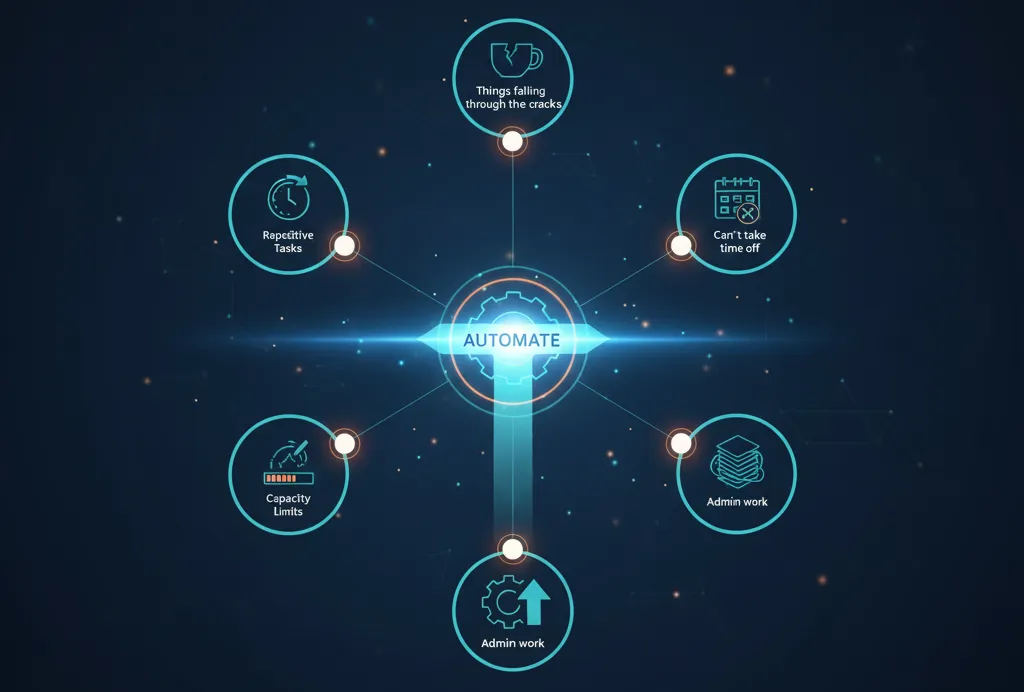
Sign #1: You're Doing the Same Tasks Over and Over (And Over)
If you find yourself thinking "didn't I just do this yesterday?" on a regular basis, that's your first clue. Repetitive tasks are automation's sweet spot.
What this looks like:
Sending the same welcome email to every new client
Manually entering data from one system into another
Creating similar invoices or proposals from scratch each time
Posting social media updates one by one across platforms
Following up with leads using the same email template
These repetitive tasks aren't just boring—they're expensive. Every minute you spend on manual repetition is a minute you're not spending on strategy, relationship-building, or revenue-generating activities.
What to automate first: Start with your email responses. Set up templated responses or canned replies for frequently asked questions. Then create automated welcome sequences for new customers or leads. These are low-hanging fruit that deliver immediate time savings.
Sign #2: Things Are Falling Through the Cracks
You meant to follow up with that hot lead. You forgot to send that invoice. A customer inquiry sat in your inbox for three days. When you're relying on memory and manual tracking, mistakes happen—and they cost you money.
What this looks like:
Leads going cold because you didn't follow up in time
Missing deadlines for client deliverables
Forgetting to send payment reminders
Losing track of where prospects are in your sales process
Tasks getting buried in endless to-do lists
The busier you get, the more things slip through the cracks. It's not a personal failure—it's a systems failure. Your brain wasn't designed to be a CRM.
What to automate first: Implement a basic CRM with automated task reminders and follow-up sequences. Set up automated payment reminders and overdue notices. Create a lead nurturing workflow that moves prospects forward even when you're busy with other clients. These automations act as your safety net, catching things before they fall.
Sign #3: You Can't Take Time Off Without Everything Grinding to a Halt
Want to take a vacation? Better not, because the business can't run without you manually handling everything. This isn't freedom—it's a self-imposed prison.
What this looks like:
Checking email constantly, even on weekends
Client emergencies that only you can handle
Revenue stopping completely when you stop working
Unable to disconnect without anxiety about what's piling up
Every customer interaction requiring your personal touch
If the business stops when you stop, you don't own a business—you own a job. Automation creates the systems that allow your business to operate independently of your constant attention.
What to automate first: Build automated client onboarding workflows that handle everything from contract signing to initial information gathering. Set up auto-responders that manage expectations about response times. Create FAQ resources and chatbots that answer common questions without your involvement. These systems give you breathing room and let you step away without everything collapsing.
Sign #4: Your Growth is Limited by Your Capacity
You could take on more clients, but you're already maxed out. You want to launch that new service, but you don't have time. Your revenue has plateaued not because of market demand, but because of your personal bandwidth.
What this looks like:
Turning away potential clients because you're at capacity
Working nights and weekends just to keep up with current workload
Unable to scale pricing because delivery is too manual
New initiatives sitting on the back burner indefinitely
Revenue directly tied to hours worked
This is the growth ceiling that automation shatters. By systematizing repetitive tasks, you free up capacity to serve more clients, launch new offerings, or finally work on your business instead of just in it.
What to automate first: Automate your most time-consuming client deliverables. If you're creating reports, use templates and automated data pulls. If you're scheduling meetings, implement scheduling software that eliminates the back-and-forth. If you're onboarding clients, create a standardized process with automated steps. Target whatever currently takes the biggest chunk of your time that doesn't require your unique expertise.
Sign #5: Your Team is Bogged Down in Administrative Work
You hired talented people to do strategic work, but they're spending half their time on data entry, status updates, and administrative busywork. This is expensive inefficiency.
What this looks like:
Team members manually updating multiple systems with the same information
Hours spent on internal status meetings that could be async
Talented employees doing work that doesn't require their skill level
Bottlenecks forming around routine approvals or handoffs
High employee frustration with "grunt work"
When your team's expertise is being wasted on tasks a system could handle, you're not just losing productivity—you're risking burnout and turnover of good people.
What to automate first: Map out your internal workflows and identify the handoff points. Automate status updates and notifications so information flows without meetings or manual updates. Implement approval workflows that route requests automatically. Set up integrations between systems so data only needs to be entered once. Start with the workflow causing the most frustration—your team will thank you.
The Automation Priority Framework
Now that you've identified the signs, here's how to prioritize what to automate first. Use this simple framework:
High Impact, Low Complexity (Start here):
Email templates and auto-responders
Meeting scheduling automation
Payment reminders and invoicing
Basic lead capture and follow-up
High Impact, Medium Complexity (Next phase):
Full customer onboarding workflows
CRM with pipeline automation
Integrated accounting and payment systems
Marketing automation and email sequences
High Impact, High Complexity (Mature automation):
Multi-system integrations
Custom workflow automation
Advanced reporting and analytics
AI-powered customer service
The key is to start small, get wins, and build momentum. Don't try to automate everything at once—that's a recipe for overwhelm and abandonment.
Common Automation Fears (And Why They're Wrong)
"It's too expensive." The cost of automation is almost always less than the cost of your time doing manual work. A $50/month tool that saves you 10 hours is paying you $5/hour to not use it.
"It's too complicated." Modern automation tools are designed for non-technical users. If you can use email, you can set up basic automation. Start simple and level up over time.
"It will make my business feel impersonal." Done right, automation makes your business MORE personal by ensuring consistent, timely communication and freeing you up to focus on high-touch interactions that really matter.
"I don't have time to set it up." You don't have time NOT to set it up. An hour invested in automation can save you hundreds of hours over the coming months.
Your First 30 Days: A Quick-Start Plan
Ready to get started? Here's a simple roadmap for your first month:
Week 1: Audit your typical week. Track how you spend your time and identify the top three most repetitive tasks.
Week 2: Choose one task to automate. Research tools, watch tutorials, or consult with an expert. Pick the easiest win from your top three.
Week 3: Implement your first automation. Set it up, test it, refine it. Don't aim for perfection—aim for functional.
Week 4: Monitor results. How much time did you save? What improved? What needs adjustment? Document your wins and lessons learned.
Then repeat the cycle. Each month, add one or two new automations. Within six months, you'll have transformed how your business operates.
The Automation Mindset Shift
The biggest barrier to automation isn't technical—it's mental. You need to shift from "I'll do it myself because it's faster" to "I'll systematize this so it's faster forever."
Every time you complete a task manually, ask yourself: "Will I need to do this again?" If the answer is yes, that's a candidate for automation. This simple question will help you spot opportunities everywhere.
Automation isn't about replacing the human elements of your business. It's about removing the obstacles that prevent you from being fully human with your clients—creative, strategic, empathetic, and present.
The Bottom Line
If you recognized yourself in even one of these five signs, your business is ready for automation. The question isn't whether to automate, but what to automate first and how to do it systematically without disruption.
Start with one repetitive task that's eating your time. Automate it. See the results. Then automate the next one. This incremental approach builds confidence, demonstrates ROI, and transforms your business one process at a time.
The businesses that thrive in the coming years won't be the ones with the most people—they'll be the ones with the smartest systems. Your competitors are already automating. Your future self will thank you for starting today.
Feeling overwhelmed by where to start with automation? Digital Real Estate Box specializes in identifying your highest-impact automation opportunities and implementing them systematically. Let's build the systems that free you to focus on what only you can do.


